
Skip to content
AccountCustomer areaBasket

Adobe Acrobat XI Pro

€47.90

Available

Final price with no extra charges, Italian invoice

Licence
Lifetime, 1 Windows device
Compatibility
Windows, see requirements

  • Licence delivered by email within business hours
  • Installation support included
  • Payment by bank transfer: bank details and reference right after you order

How payment works

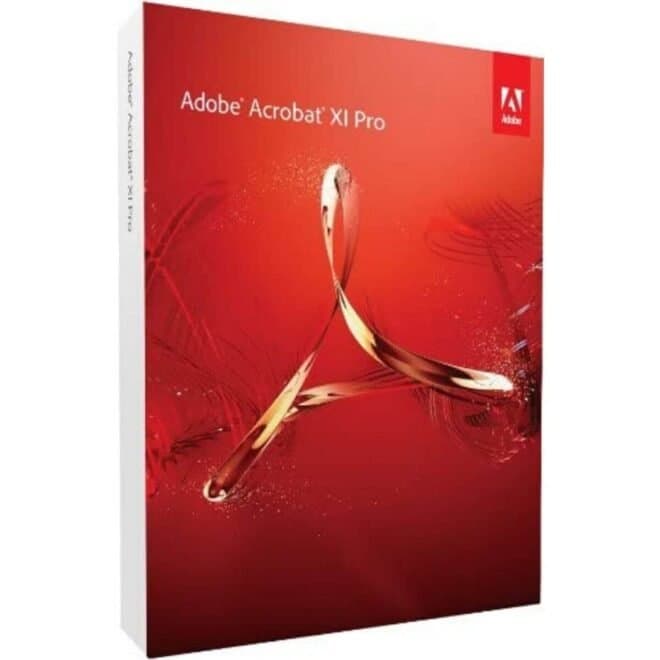
Adobe Acrobat XI Pro box
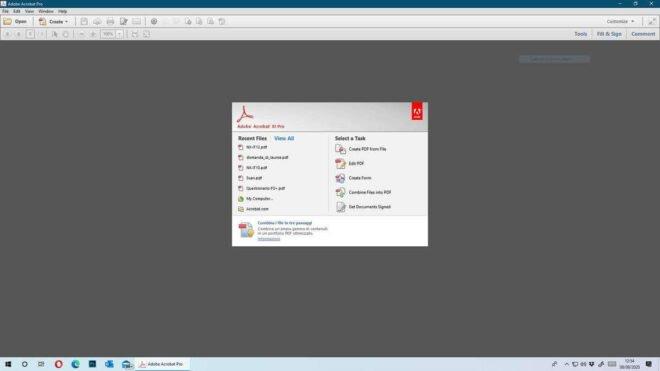
Adobe Acrobat XI Pro welcome screen on Windows

At a glance

  • Edit text and images directly in the PDF, without going back to the source file.
  • Convert PDFs to Word, Excel and PowerPoint, and create PDFs from any application that prints.
  • Turn scans into searchable, editable PDFs with text recognition (OCR).
  • Protect documents with passwords, permissions and permanent removal of confidential data.
  • Lifetime licence for 1 Windows device: one-off payment, no subscription.

Technical details

Compatibility
Windows
Edition
Pro
Language
All languages
Duration
Lifetime
Delivery
By email within business hours

RAI store rating: 4.99/5 from 143 rated reviewsRead the reviews

Main features

Adobe Acrobat XI Pro is version 11 of Adobe's professional PDF editor, released in 2012. It is for people who work with PDFs every day: fixing text, converting a document to Word or Excel, merging files, preparing fillable forms and protecting what they send.

  • Edit

    • Fix text, fonts and paragraphs directly in the PDF.
    • Resize, replace and adjust images.
  • Convert and create

    • Export PDFs to Word, Excel and PowerPoint, keeping formatting and layout.
    • Create PDFs from Word, Excel, PowerPoint, web pages and any application that prints.
    • Scan paper documents into searchable, editable PDFs (OCR).
  • Organise and fill in

    • Merge documents, spreadsheets and emails into a single PDF or a PDF portfolio.
    • Convert paper, Word or Excel forms into fillable PDF forms.
  • Review and sign

    • Shared reviews with comments and annotations, exportable to Word.
    • Compare two versions of the same file with a report of the differences.
    • Sign documents with an electronic signature.
  • Protect and standardise

    • Passwords and permissions against copying and editing.
    • Permanent removal of confidential information, including from metadata.
    • Create and check PDFs that comply with ISO standards and accessibility requirements.
    • Guided Actions to repeat the same steps every time.

Who it is for

A good fit for

  • Professional firms and offices that edit, convert and archive PDFs every day.
  • People who work on Windows and prefer a one-off purchase to a subscription.

Not a good fit for

  • Anyone who needs Adobe security updates or the online features of more recent Acrobat versions.
  • Mac users: this licence is for Windows.

Compatibility and requirements

System Requirements for Acrobat XI Pro for Windows®

  • Processor of at least 1.3 GHz
  • Microsoft® Windows XP with SP3 for 32-bit (with SP2 for 64-bit); Windows Server® 2003 R2 (32-bit and 64-bit); Windows Server 2008 or 2008 R2 (32-bit and 64-bit); Windows 7 (32-bit and 64-bit); Windows 8 (32-bit and 64-bit); Windows 10 (32-bit and 64-bit); Windows 11 all versions
  • 512 MB of installed RAM (1 GB recommended)
  • 1.9 GB of available disk space (note: temporary files are created during installation, so the disk space initially required is greater than the value stated here)
  • Screen resolution 1024×768
  • Internet Explorer 7, 8, 9, 10; Firefox (ESR); Chrome
  • DVD-ROM drive, if installing from DVD
  • Hardware acceleration for video (optional). For Windows Server 2003 SP2 and Windows XP SP2 64-bit, Microsoft Hot Fix KB-930627 is required.

What you receive

  • The licence code by email, within business hours: please check your spam folder too.
  • The installation instructions and the software download link, in the same email.
  • The Italian invoice, for individuals and VAT-registered businesses.
  • A technician to help you if installation or activation doesn't go as expected.

Full details on timing and delivery: how delivery works

Installation and activation

The instructions arrive by email with the licence. If something goes wrong, a technician walks you through it step by step; the guides below cover the most common steps.

Useful guides from our blog (in Italian)

Description

Read the full description
  • Lifetime Licence Adobe, full version with no subscription
  • Available in all languages
  • Export PDF to Word, Excel and other editable formats
  • Advanced protection: digital signature, password and encryption
  • Delivered by email within business hours; orders placed outside business hours are handled on the next working day

The Best Program for Editing and Converting PDFs, with OCR Functions Too

Adobe Acrobat XI Pro®, that is, version 11 professional, is much more than a simple PDF editor: it handles every editing task on your PDF files without any risk of losing information, and it is also packed with smart tools that give you even greater communication power.

Note: Adobe Acrobat XI Pro was released in 2012 and official support ended on 15 October 2017. We recommend checking the availability of more recent versions, such as Adobe Acrobat DC, for up-to-date features and ongoing support.

Technical Features

  • Edit PDF text without using Word. Fix an error, change a character or add a paragraph to your PDF as easily as you use other applications, with a new point-and-click interface.
  • Edit the images in your PDF. Resize, replace and adjust images in your PDF without having to track down the original file or image.
  • Convert PDF files to Word. Save your PDF as a Microsoft Word document without losing fonts, formatting or layout.
  • Convert PDF files to Excel. Turn your PDF, or just part of it, into an editable Excel spreadsheet you can use straight away for data analysis.
  • Convert PDF files to PowerPoint. Get a head start on new projects by saving a PDF file as a fully editable PowerPoint presentation.
  • Convert Word, Excel or PowerPoint to PDF . From the Office application in Windows, you can create PDFs, start a shared review, restrict PDF edits and more.
  • Print to PDF. Convert files to PDF from virtually any application that can print, simply by selecting Adobe PDF as the printer.
  • Scan to PDF. When you need to turn a paper document or form into a digital file, just scan it to create a PDF file you can edit.
  • Convert HTML pages to PDF. Save web pages as PDF files to archive web content, review pages offline or print them more reliably.
  • Create new PDF and web forms. Customise templates or professional designs from scratch with the Adobe FormsCentral desktop app included in Acrobat XI Pro.
  • Convert existing forms into fillable PDFs. Type less, collect more. Quickly convert your paper, Word or Excel forms into fillable PDF forms.
  • Collect form responses using Acrobat's tools. Compile the returned forms into a single PDF, or host the forms using a network folder or a Microsoft SharePoint server.
  • Merge multiple files into a single PDF. Combine documents, spreadsheets, emails and more into one organised PDF.
  • Combine files into a PDF portfolio. Share your work in a PDF portfolio that presents your materials professionally, with interactive impact.
  • Create interactive PDF files. Bring your ideas to life by adding audio, Adobe Flash® Player-compatible video and interactive media to your PDFs.
  • Simplify document reviews and approvals. In shared reviews, people can annotate PDFs with familiar tools. And you can track progress and consolidate comments.
  • Export comments to Word. Save all PDF comments into the original Microsoft Word document and update the text faster than ever.
  • Sign with an electronic signature. Speed up your work by signing your approval directly on the PDF. No need to print, fax or post the document.
  • Get others to sign documents. Get sign-off faster. Send PDFs to others for signature approval and track them online using the Adobe EchoSign® service.
  • SharePoint integration. With Acrobat, it's simple and convenient to retrieve, open and save PDFs stored on your company's SharePoint server.
  • Compare two file versions. Let Acrobat do the hard work of comparing two versions of a file, providing a detailed report of the results.
  • Apply PDF passwords and permissions. Get expert-level protection without being an expert. Add copy and editing protection to any PDF, even directly from Microsoft Office applications in Windows®.
  • Remove and redact information. Don't just black out confidential data. Find it and get rid of it for good, even when it's hidden in the metadata.
  • Automate document security tasks. Always apply document security measures the same way. Use a guided action to protect the PDF before publishing it.
  • Confirm PDF ISO standards. Create and validate PDF documents that comply with the standards managed by the International Organization for Standardization (ISO).
  • Standardise routine PDF tasks. Simplify ongoing PDF creation. Guide people through the correct sequence of steps with Actions.
  • Meet PDF accessibility standards. Acrobat XI helps you create and check PDFs that meet accessibility standards, so people with disabilities can interact with your PDFs.
  • Sign documents electronically. Track multi-step approvals of PDF documents using standards-compliant electronic signatures.

Benefits for the User:

  • Operational Efficiency: Reduces the time spent managing documents, improving productivity.​
  • Simplified Collaboration: Makes it easier to review and share documents with colleagues and clients.​
  • Enhanced Security: Protects confidential information through advanced security features.

Frequently Asked Questions

  1. How many users can use the software with this licence?
  2. Is the licence tied to the hardware, or transferable to another PC if you change computer?

Answers

  1. The licence is valid for 1 device only
  2. The licence is NOT tied to the hardware and is transferable from PC to PC

Frequently asked questions

Is it a subscription?

No. It is a lifetime licence with a one-off payment and no renewals.

How many computers can I use it on?

On 1 device. The licence is not tied to the hardware: if you change PC you can transfer it.

Does it work on a Mac?

No, this licence is for Windows.

Will I receive updates from Adobe?

No. Adobe ended support for Acrobat XI on 15 October 2017 and no longer releases updates or security fixes for this version.

How and when do I receive the licence?

By email, within business hours; orders placed outside business hours are handled on the next working day. The same email contains the licence code, the installation instructions and the link to download the software.

How can I pay?

Payment by bank transfer: once you confirm your order you receive our bank details and the payment reference straight away.

Do I get an invoice?

Yes: an Italian invoice with every order, for private customers and businesses.

What if installation or activation does not work?

A technician guides you step by step. If the problem remains, the terms on this page apply: Returns and refunds.

Questions before you buy?

Not sure which version you need? Message us on WhatsApp, call +39 324 611 3236 or email supporto@riparazioneassistenzaitalia.it. We answer Mon–Fri 9:00–12:30 and 15:30–20:00.

Reviews

Reviews are shown in the language the customer wrote them in (Italian).

Reviews of this product

4.98/5 from 124 rated reviews (129 in total), source Riparazione Assistenza Italia

  • Margherita C.

    Verified purchase

    Ringrazio vivamente per l'offerta e di aver dato la possibilità di acquistare il migliore software per la gestione dei file Pdf ad un prezzo accessibile. Grazie a tutti

    Source: Riparazione Assistenza Italia, original listing
  • Walter C.

    Verified purchase

    Rispetto la diffusa impossibilità di contattare telefonicamente fornitori e produttori di PC e Software, va dato merito sia per questa possibilità sia per la precisione nelle consegne e sia per la funzionalità dei prodotti venduti, che si attivano e si aggiornano senza problemi, e per i quali vengono fornite informazioni chiarissime. Grazie

    Source: Riparazione Assistenza Italia, original listing
  • Claudio

    Verified purchase

    Istruzioni di installazione puntuali e chiare. Grazie.

    Source: Riparazione Assistenza Italia, original listing

  • Domenico V.

    Verified purchase

    Facilità di navigazione sul Web per individuazione e riscontro delle caratteristiche dei prodotti. Tempismo, completezza ed efficacia delle istruzioni sul prodotto. 110 cum laude!!!

    Source: Riparazione Assistenza Italia, original listing

  • Alfredo T.

    Verified purchase

    OTTIMO ACQUISTO E OTTIMA ASSISTENZA DELL'OPERATORE ANDREA CHE NONOSTANTE FOSSE IL GIORNO DEL SUO COMPLEANNO, MI HA SEGUITO PASSO PASSO NELL'INSTALLAZIONE DEL PROGRAMMA. EFFICIENTE E PROFESSIONALE , 10 E LODE BRAVISSIMO

    Source: Riparazione Assistenza Italia, original listing

  • Luca

    Verified purchase

    Ottimo servizio, la chiave di licenza funziona, e hanno perfino chiamato loro per chiedermi se tutto era andato bene. Installazione agevole. La versione ovviamente è un pò vintage rispetto a quelle attuali, ma fa il suo lavoro senza problemi.

    Source: Riparazione Assistenza Italia, original listing

Read all 128 written reviews of this product

Customer experiences with RAI

These reviews are about the buying experience with Riparazione Assistenza Italia, not necessarily this product. Customer reviews of purchases in the RAI store, source Riparazione Assistenza Italia.

Read all reviews

Related products

Adobe Acrobat XI Pro

€47.90

Available

Final price with no extra charges, Italian invoice, licence by email within business hours

Adobe Acrobat XI Pro€47.90Final price